How the platform is built
Applies to: SimpleTwo 0.9.x · Checked: 08.10.2026
The platform is installed entirely inside your own perimeter. Below is what it is made of and what talks to what; the role-by-role installation is in the deployment manual. Which roles belong to the base and to which product is in Products.
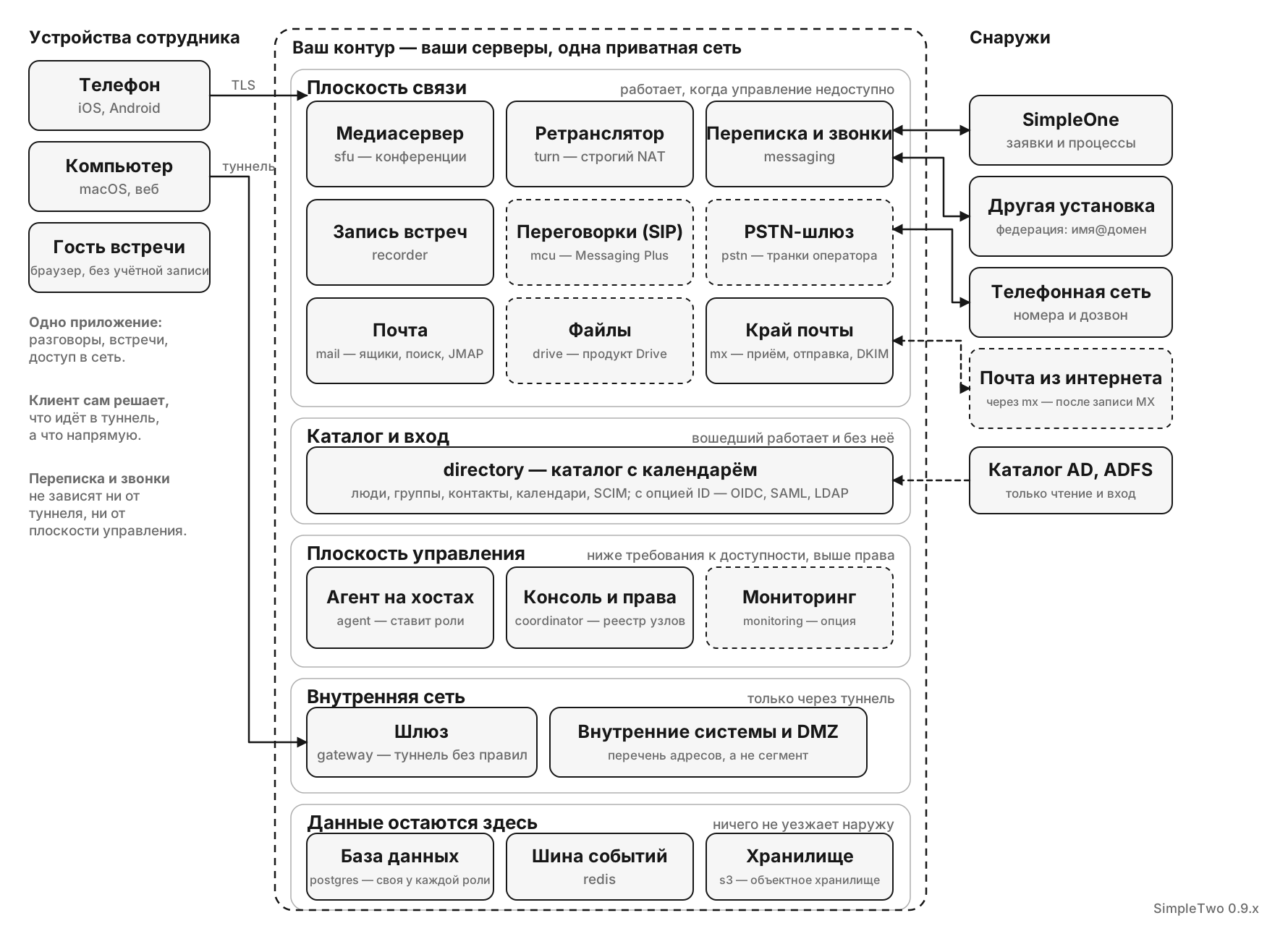
The planes, and why the split is load-bearing
The split is not organisational, it is about availability requirements: communications, the directory, the intranet and management have different ones, and mixing them means holding everything to the strictest.
| Plane | Services | How it is reached | Availability requirement |
|---|---|---|---|
| Communications | messaging, sfu, turn, recorder, mcu, pstn, mail, mx, drive | directly over TLS; the tunnel is not required | the highest — it has to work while the tunnel is down, or "the VPN is down and there is no way to say so" |
| Directory and sign-in | directory | directly over TLS on 443, with its own certificate | high for new sign-ins: without it nobody signs in afresh, while whoever is signed in keeps working — sessions are issued and renewed by coordinator |
| Intranet | gateways, internal systems, the DMZ | through the tunnel only | follows the tunnel; a gateway failure is a routing incident, not a communications one |
| Management | coordinator, the console, the node API, agent, monitoring | tunnel or SSH | the lowest, with the highest privileges: the platform is designed so that conversations outlive its own unavailability |
Services
| Service | Responsible for | Note |
|---|---|---|
| coordinator | sessions and permissions, policy, the node registry, meetings, the admin console, the product options; who runs the browser sign-in — it or directory — and whose token the services accept are switches in the console, see Sign-in: the coordinator and identity | one instance by design; what scales is not it, but the ability to work without it |
| directory | the directory with the calendar: accounts, groups and the organisation's contacts, SCIM; calendars, invitations, ICS and CalDAV, personal and team address books (CardDAV) — the calendar answers under /cal on the same name; sign-in of local accounts and guests with a second factor and sign-in approval on the phone, the broker to the organisation's identity provider | part of the core: the organisation's groups and contacts live only here. More in sign-in and participants |
| messaging | conversations and messages, call signalling, presence, bots, attachments | scales horizontally behind an event bus |
| sfu | conference media | a pool of nodes behind a TLS edge; adding a node is adding capacity |
| turn | relaying media where the direct path is closed | needed on networks with strict NAT |
| recorder | meeting recording | files go to your storage, never outside it |
| mcu | the media server for your meeting-room SIP terminals (Poly, Cisco) in meetings, with voice, video and presentation. Not the PSTN gateway: it has no trunks and no telephone numbers | Messaging Plus; one node, or several behind DNS SRV |
| pstn | the PSTN gateway: a carrier's SIP trunks, dialling into a meeting and calling telephone numbers | Messaging Plus; a host of its own, never shared with mcu. More in telephony |
| mailboxes and search, JMAP and push for the clients, Sieve rules and the vacation response, shared mailboxes | its own database and its own storage; mail from the internet is received by mx, not by it | |
| mx | the mail edge in the DMZ: receiving from the internet and sending out with a DKIM signature, SPF, DKIM and DMARC checks, content filters; submission for devices and integrations | no database and no mailboxes — only a queue on its own disk; two nodes by design. More in mail |
| postgres | the database: every role has its own database on one instance | the base's infrastructure; your own Postgres cluster can stand in for the role |
| redis | the event bus: coordination of the sfu and mcu nodes, recording jobs | needed from the second sfu or mcu node and for recording; an external one can be used |
| s3 | object storage: attachments, avatars, recordings, mail, files | infrastructure; an object is an ordinary file, so backup and migration are filesystem work. Instead of the role you can point the platform at storage you already run |
| gateway | a VPN node | a "dumb" tunnel: it holds no rules of its own |
| agent | installs and updates roles on hosts | certificates and configuration arrive the same way |
| monitoring | metrics, logs and traces from every host; its interface opens from the console | an option for any installation, one per installation; holds no product data — without it only the history is lost |
| support | the support bot: requests, the knowledge base, AI-assisted answers | Messaging Plus |
| drive | the files a person keeps: a personal space for everyone who has signed in and a space per group in their token; its catalogue in its own database, the files in object storage; iOS, macOS and Android clients | the Drive product; obtains its own certificate for its public name, which is announced to clients as drive_url once it answers (files) |
Data
Postgres is the source of truth for conversations, calendars, the directory and mail, each
service in its own database; the event bus (redis)
carries events between messaging instances; files and recordings live in object storage inside
your perimeter. None of the three faces the internet.
Storage comes one of two ways, like the database: the s3 role inside the platform, or external
S3-compatible storage you already run (MinIO, AWS S3, Ceph, anything speaking the same protocol).
The console shows which one is in effect. File bytes always travel through messaging, which
checks the right to every file; the platform never hands out links straight into the store. The
role keeps an object as an ordinary file, so on ZFS a filesystem snapshot is a consistent
backup of the attachments and zfs send is a copy at a second site. The disk for objects is
requested when the host is added: the platform builds the pool and the dataset with the
properties it needs and refuses a disk with anything already on it.
Boundaries with external systems
| System | Direction | What crosses the boundary |
|---|---|---|
| AD / ADFS | read-only: people into coordinator, groups into directory | who exists, groups, attributes; the platform never writes back. ADFS is also a sign-in provider for directory |
| SimpleOne | both ways, through messaging | a conversation linked to a ticket, presence, and a call from inside the ticket form |
| Another SimpleTwo installation | both ways, through messaging | messages addressed user@domain — federation, off by default |
| Meeting-room SIP terminals | inbound, through mcu | joining a meeting by the room's number |
| Telephone network (PSTN) | through pstn, the PSTN gateway | dialling into a meeting and calling telephone numbers |
| Mail from the internet | through mx | the outer ring of the same federation: receiving and sending, DKIM, SPF, DMARC and MTA-STS. Mail from the internet comes in once you publish an MX record pointing at an mx node |
It shows roles and boundaries, not sizes. How many sfu nodes and how large is a sizing
question, and it is answered by the number of simultaneous conferences rather than by headcount.